
No.1 Computer Training Institute In Ludhiana
Diploma In Computer Applications
- 180 Hours
- 100% Practical
- ISO Certified
- Basics
This professional computer course helps students learn basic computer knowledge and practical skills needed in digital world. The course includes computer fundamentals, MS Office applications, internet , typing, and other important computer concepts with quality training. It is efficient for students, beginners, job seekers, and working professionals who want to start their computer learning journey, improve career opportunities, and become more efficient in office and business work.
Course Description
This computer course gives students a practical introduction to computer technology and office tools. It is beneficial for beginners, students, job seekers, and working professionals who want to develop strong computer skills for study, office work, and personal use. The course provides basic knowledge of software concepts to help learners use modern digital tools with confidence.
This course covers important topics like Windows Operating System, MS Word, MS Excel, MS PowerPoint, internet, email sending, typing skills and basic database management. The course also includes practical practice and simple daily computer tasks so students can learn comfortably and use computers in life.
During the program, students develop problem solving skills and gain practical experience that can be applied in many industries and office environments. Learners who complete the course will be better prepared to enter the job market at an entry level position in a computer related field or continue their academic studies in computer science, information technology, or software development. This is a perfect course for anyone who wants to improve digital skills and create better career opportunities in today’s technology world.
Curriculum
Module 1: Windows OS
This module introduces students to the Windows operating system and its features. It covers file and folder management, control panel settings, system tools, desktop customization, and basic troubleshooting. Students learn how to efficiently operate and manage a computer system using Windows.
Module 2: Microsoft Word
Microsoft Word is a word processing application used for creating, editing, formatting, and printing documents. This module covers document creation, text formatting, tables, images, page layout, mail merge, and professional document preparation.
Module 3: Microsoft Excel
Microsoft Excel is a spreadsheet application used for data organization, calculations, and analysis. Students learn to create worksheets, use formulas and functions, prepare charts, manage data, and generate reports for business and office purposes.
Module 4: Microsoft Access
Microsoft Access is a database management system that helps store, organize, and retrieve information efficiently. This module covers database creation, tables, queries, forms, reports, and basic database management techniques.
Module 5: Microsoft Powerpoint
Microsoft PowerPoint is a presentation software used to create professional slide presentations. Students learn to design slides, add text, images, animations, transitions, charts, and multimedia elements to deliver effective presentations.
Module 6: Microsoft Publisher
Microsoft Publisher is a desktop publishing application used for designing professional publications. This module teaches students to create brochures, flyers, newsletters, business cards, posters, and other marketing materials with attractive layouts.
Module 7: Internet
This module provides knowledge of internet technologies and online communication. Topics include web browsing, search engines, email creation and management, online safety, cloud services, and effective use of internet resources for education and business.
Module 8: Fundamentals
Computer Fundamentals introduces the basic concepts of computers, including hardware, software, input/output devices, memory, storage, and computer applications. Students gain a strong foundation in computer technology and its practical uses in everyday life.
Key Features
- Duration: 180 Hours
- 100% Practical Training
- Basic Category
- 1500+ Students Trained
- Expert Trainer
Career Options After Learning DCA (Basics) Course

Computer Operator
Data Entry Operator
Office Assistant
E-commerce Assistant
Computer Teacher (Basic Level)
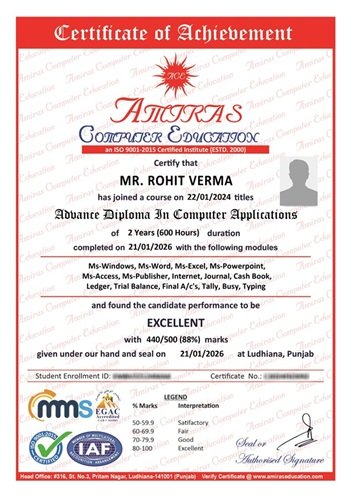
Certificate You Will Receive
25+ Years of Trusted Learning & Certification
Since 2000, Amiras Computer Education has successfully trained and certified more than 5,000 students in computer skills and authorized certification programs, that helps you to build better career opportunities. With years of experience in quality computer education, we focus on teaching in simple, easy to understand language while using modern technologies and career oriented training methods that support your personal and professional growth.
- Industry Recognized
- Resume Value
- Career Support
- Skill Verification
- Confidence Building
Who Can Join This Course?
Students / Interns
Students and job seekers can join Amiras Computer Education to learn practical computer skills for better career and future opportunities.
Professionals
Working professionals can update their skills with AI tools and new technologies at our Training Institute.
Everyone of Any Age
Anyone of any age can join any course at our computer center. No experience or qualifications are required to start.
Frequently Asked Questions (FAQ's)
What courses are offered at Amiras Computer Education ?
Is the institute ISO certified?
Do you provide certificates after course completion?
Am I eligible for the course at Amiras Computer Education?
What is the duration and fees structure of the courses?
Do you teach AI and modern digital tools?
Do you offer practical training sessions?
Yes, our computer training is completely practical. Students get live experience through projects, assignments, and examples. This helps improve practical skills and prepare students for jobs, freelancing, and industry work.
Do you provide job assistance after computer courses?
Will I Learn from Experienced Trainers?
More Courses
Advanced Excel With AI Tools
Advanced Level
40 Hours
Level up your Excel skills and learn to use AI tools to work smarter and analyze data more efficiently.
Advanced Diploma In Computer Applications
Advanced Level
360 Hours
This course teaches advanced skills, internet, and accounting, designing helping you prepare for tech jobs.
Website Development
Advanced Level
180 Hours
This course teaches how to create visually engaging, responsive websites using HTML-CSS, No Code Site and more...